
Robotic Arm Manufacturer,Supplier and Exporter
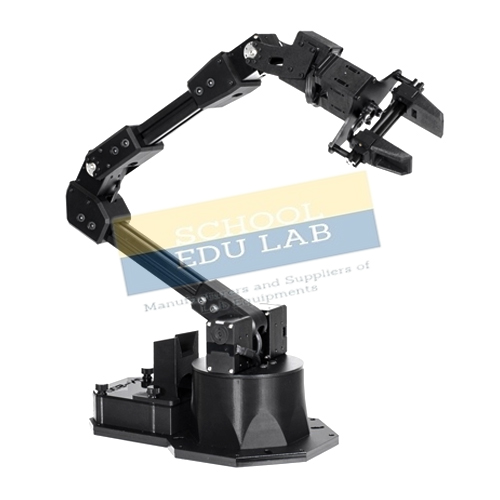
Product Code : SEL-CTM-11622
Quick Answer: This Robotic Arm trainer, with the equivalent of a shoulder, elbow and wrist, is controlled from computer software or its own control panel, and students program tasks in an editor before downloading them to the arm's processor.
Last updated: October 2026
Key Features
- Control from PC software or the control panel
- Control panel with LCD, switches, home sensor LED, DIP-switch external interface connector and USB
- Each axis and each servo controlled individually by start angle, stop angle and speed
- Programming editor; compiled instructions download to the arm's processor
- Study of stepper, servo and DC motors and feedback control
- Optional PLC interfacing, USB data acquisition, auto return to home position
Technical Specifications
| Specification | Value |
|---|---|
| Control | PC software or control panel |
| Control panel | LCD, switches, home sensor LED, external interface connector with DIP switches, USB interface |
| Joint equivalents | Shoulder, elbow, wrist |
| Motor types studied | Stepper, servo and DC, with feedback control |
| Processors | 8-bit microcontroller and higher |
| Data acquisition | USB |
| Interfacing | Optional PLC |
| Switch | Touch-operated ON/OFF |
| Supplied with | Course material, references and demo programs |
About This Product
Robotics draws on mechanics, electronics and computer science, and this arm brings them together on one bench. From the software, each degree of freedom can be moved with a mouse click or keyboard, and each servo can be given a start angle, stop angle and speed. Learners then write instructions in the editor, compile them and download them to the arm for a defined automation task, and can go on to develop their own applications with the course material and demo programs. Buyers in Malaysia, Nicaragua, Mozambique, South Sudan and Lebanon can send an export enquiry for the Robotic Arm.
Frequently Asked Questions
How is the Robotic Arm programmed?
Instructions are written in the editor window of the software, compiled and downloaded directly to the arm's processor for a defined automation task. Each degree of freedom can also be moved individually by mouse click or keyboard.
Can it be used without a computer?
Yes. It can be controlled from its control panel, which has an LCD, switches, a home sensor LED, an external interface connector with DIP switches and a USB interface.
Does it connect to a PLC?
PLC interfacing is available as an option.
Related: CNC Trainer Machine, PLC and HMI Training Kit, Flexible Manufacturing System, Electro Pneumatic Trainer.
For a quotation on the Robotic Arm, contact School Educational Instrument.


.jpg)
